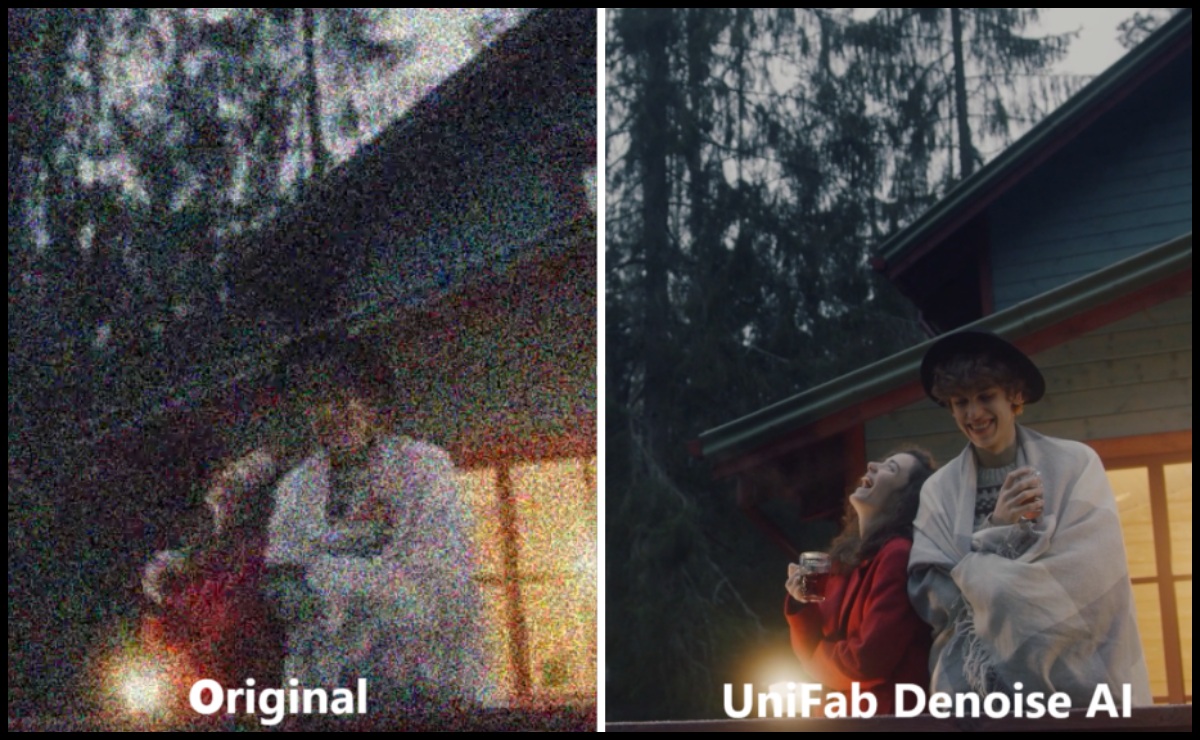
In today’s world, videos are everywhere — from social media posts and family memories to professional marketing campaigns and documentaries. However, no matter how great your content is, one common thing can ruin the viewer’s experience: video noise. You’ve probably seen it — that grainy, speckled look especially in videos shot at night or with older cameras. It distracts from what matters and makes your video feel less polished. The good news? You don’t need to be a video editing pro or spend hours fixing it. With UniFab’s AI Video Enhancer, you get an easy and effective way to clean up your videos and get them looking their best.
What Is Video Noise and Why Does It Matter?
Video noise appears as tiny dots, grain, or static throughout your footage. It often happens when shooting in low light or with small sensors. Noise doesn’t just reduce the quality—it takes away from the emotion, the story, and the professionalism of your video. Imagine watching a heartfelt family moment or an important product demo, and instead of focusing on the content, your eyes get caught up in the distracting graininess.
Traditionally, getting rid of noise means hours of tedious manual editing using complicated software. If you’re not an expert, it often ends with videos looking blurry, overly smooth, or unnatural because the noise was removed too aggressively.
How UniFab Denoise AI Makes Noise Removal Simple (and Effective)
Here’s where UniFab Denoise AI changes the game. It’s built to work with smart AI technology that understands your video on a deep level. Instead of just applying a basic filter, it analyzes every frame to separate noise from the real details — like faces, textures, and backgrounds. This means it keeps all the good stuff intact while getting rid of the annoying grain.
And the best part? You don’t need to be a tech wizard. UniFab is designed for everyone, whether you’re just starting or have experience with video editing.
Key Features That Matter to You
- Smart Noise Reduction: Cleans up grain without losing sharpness or detail.
- Supports Many Formats: No matter if you have MP4, MOV, or others, UniFab works smoothly.
- Quick & Efficient: Thanks to advanced tech, your enhanced video won’t take forever to process.
- User-Friendly: Simple steps and intuitive interface — no confusing menus.
- Natural-Looking Results: The video doesn’t look “doctored” or fake after noise removal.
Step-by-Step Guide to Using UniFab Denoise AI
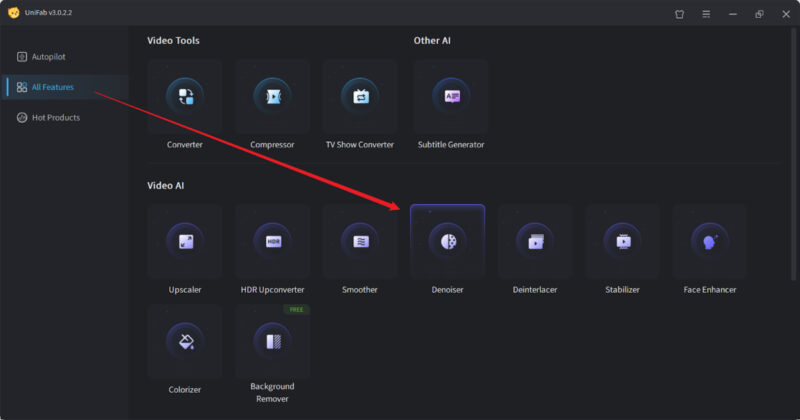
Step 1: Open UniFab and Upload Your Video
Launch the software, then either drag and drop your video file or use the upload button to import it. Choose the denoising mode that fits your needs, whether you want light cleanup or a more thorough noise reduction.
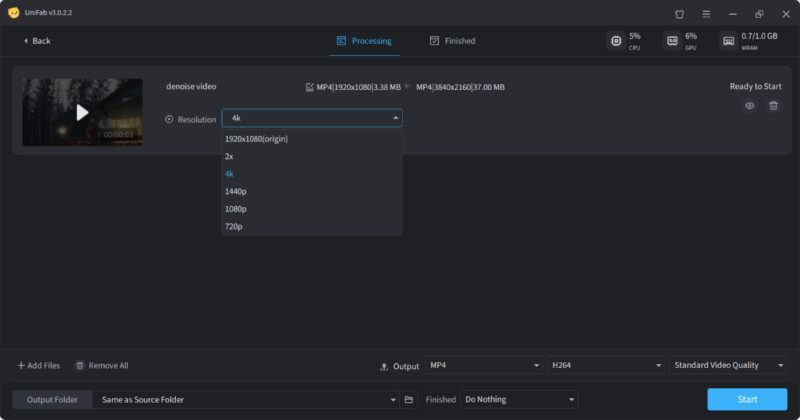
Step 2: Customize Output Settings (If Needed)
You can leave the default settings if you prefer a quick fix, or customize resolution, output format, quality, and codec. This is great if you want your video ready for a specific platform or device.
Step 3: Start the Denoising Process
Once you’re happy with your choices, click the “Start” button. The AI will handle the rest, cleaning up noise carefully while preserving the natural look of your footage. When done, your video will be ready to preview and save.
Real-Life Benefits of Cleaning Up Your Videos
- Preserve Memories: Old home videos or holiday trips often have noise. Removing it with UniFab makes them look fresh again, better for sharing with family and friends.
- Boost Professionalism: Marketers and businesses can improve customer impressions with cleaner, clearer product videos or presentations.
- Save Time: What used to take hours or days manually is now done quickly and automatically.
- Avoid Expensive Equipment: Instead of buying high-end cameras, use smart AI tools to improve what you already have.
Why AI-Powered Video Denoising Is the Way Forward
The difference between manual and AI-based noise removal is like comparing a screwdriver to a power drill. AI Video Denoiser like UniFab learns from thousands of videos, so they know exactly how to treat different scenes. This means better quality and fewer mistakes. Manual denoising is often guesswork and can damage the video quality if you’re not careful.
Conclusion
No one wants their beautiful videos ruined by distracting noise. With UniFab Denoise AI, cleaning up your footage becomes an easy and stress-free task. Whether you’re preserving precious memories or polishing professional content, this AI-powered Video Denoiser gives you natural, high-quality results with minimal effort.